Shake Shack
- 4.1
- Rating
- 1.00M
- Installs
- Free
- Price

 Analysis by App-foxy
I installed Shake Shack to see whether its ordering tools genuinely make a visit easier, rather than simply putting a restaurant menu on a phone. My main focus was the app’s order-ahead experience: choosing food before arriving, reducing time spent waiting, and handling the visit with fewer decisions at the counter. That sounds straightforward, but the value depends on how well the app fits the way you actually eat at Shake Shack.
My overall impression is positive, especially for people who already have a preferred order or regularly visit during busy periods. The app is free, made by Shake Shack, and sits in the Food & Drink category. It is suitable for Everyone, runs on devices using OS 9 or later, and has reached over a million installs. Those figures suggest it is not a niche experiment; it is intended to be a regular part of the restaurant’s ordering routine.
What makes it worth considering is not that it replaces the restaurant experience. It does not make the food cheaper by default, remove every wait, or turn an occasional meal into a completely frictionless process. Instead, it gives me a way to prepare the order in advance and use the brand’s own offers and challenges in the same place. For a quick lunch, that combination can be more useful than relying on a general delivery service or standing in line with a group trying to decide.
You May Also Like

 Blood Strike: 2.5 Anniversary
Blood Strike’s Loadouts Turn Every Drop Into a Tactical Gamble
A close look at Blood Strike’s custom loadouts: how fast access to signature weapons reshapes its battle royale rhythm, rewards preparation, and narrows the gap between fights.

 Pandora - Music & Podcasts
Pandora’s Music Is Easy to Start, but Harder to Recover
Pandora’s strength is its low-effort path from a seed to a station. Its weak spot is how much confidence it asks you to place in connection, setup, and quiet recovery.

 8 Ball Pool
 Is Built on Rivalries, Rematches, and Routine
A close look at the rivalries, rematches, shared routines, and unanswered safety questions that turn a quick pool match into a persistent mobile community.

 Samsung Music
’s Quiet Strength Is Playing What You Already Own
Its reach comes less from spectacle than from dependable access to a personal library. That simplicity is both the app’s strongest retention engine and its ceiling.

 AccuWeather: Weather Radar
AccuWeather Review: A Quick, Clear Forecast for Everyday Decisions
For everyday plans, the best forecast is the one you can understand quickly. AccuWeather makes rain timing, radar, and local conditions easy to act on, with a few trade-offs.

 Hill Climb Racing
Why Hill Climb Racing Still Turns Crashes Into One More Run
A tiny car, a bumpy hill and one more upgrade: Hill Climb Racing keeps resurfacing because its simple chaos makes every near-miss feel personal.
More From Our News Desk



Order ahead is the app’s most useful capability
The central feature is the ability to place an order before reaching the restaurant. In practical terms, I can look through the available menu, make choices on a larger screen than the counter display, and submit the order through the app. The important change is psychological as much as logistical: I can decide while sitting at home, walking toward the location, or waiting for friends, instead of making those decisions while people are behind me.
That matters most when my order is familiar. If I already know which burger, fries, shake, or drink I want, the app turns the visit into a preparation step followed by collection. I am less likely to forget a modification, mishear a choice, or hold up the queue while comparing options. The real benefit is decision time moving away from the counter, not a promise that every part of the restaurant visit disappears.
The app also combines ordering with delivery access, which gives it a wider role than a simple pickup tool. I can use the same restaurant-focused interface when I want the food brought to me rather than collected. That is convenient for a workday or an evening when travelling to a location is less appealing, although delivery is naturally a different experience from ordering ahead for pickup.
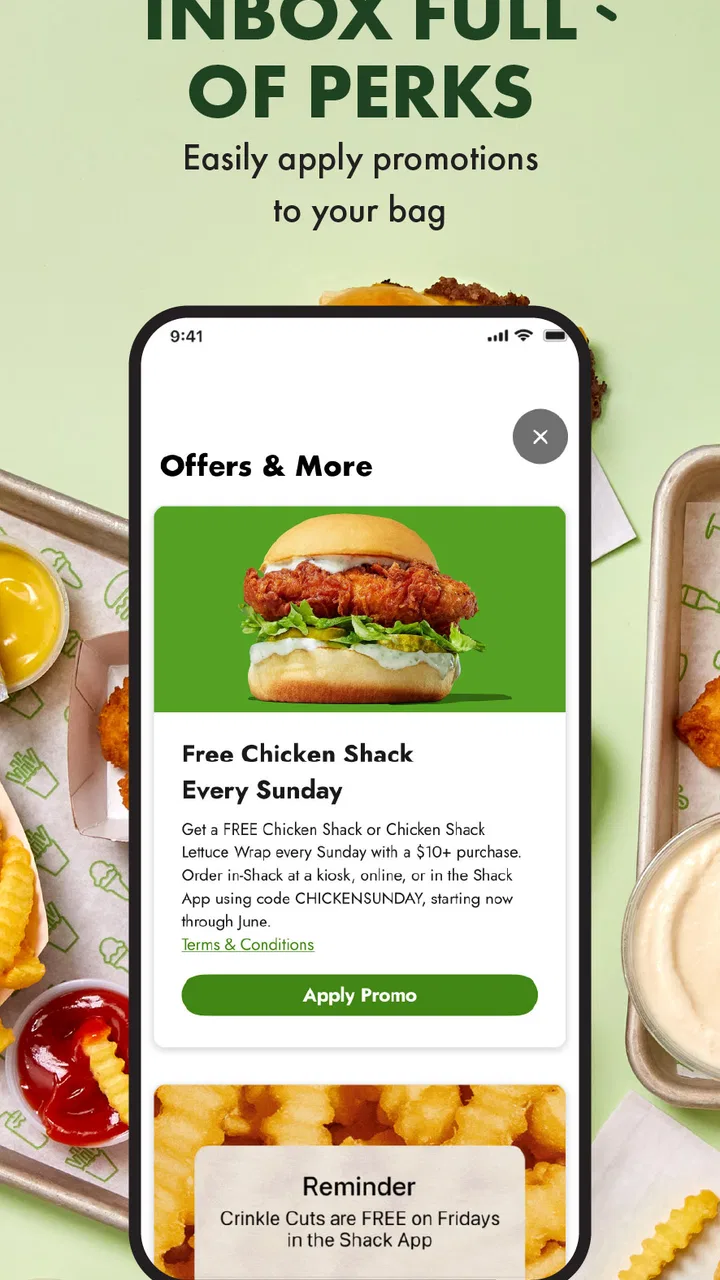
I also found the offers and challenges worth paying attention to. They give the app a reason to remain installed between visits, rather than being something I download once and delete after placing an order. The exclusive offers can influence when I choose the app instead of a standard restaurant search, while challenges add a small layer of engagement around repeat use. I would not install it solely for that extra layer, but it makes the app feel less like a static menu.
What the ordering flow changes
Compared with ordering at the restaurant, the app gives me more control over the pace of the decision. I can review the basket before submitting it and catch an accidental extra item or an unwanted choice. That review step is particularly useful when ordering for several people, because group orders are where counter conversations become confusing. I can build the order in a calmer setting and show the final total to the group before committing.
There is also a useful separation between browsing and paying. When I am hungry, I tend to make poor decisions quickly. Looking through the menu before I arrive lets me think about whether I actually want a full meal or just a smaller order. This is a modest advantage, but it is one I notice more than promotional language: the app makes it easier to pause before pressing the final button.
On the other hand, ordering ahead is not automatically faster in every situation. I still need to choose the correct restaurant and allow enough time for the order to be prepared. If I submit too early, I may arrive before the food is ready; if I submit too late, I have not gained much over ordering in person. The feature rewards a little planning, so it is best treated as a timing tool rather than an express lane with guaranteed results.
How I would use it during a normal visit
My preferred workflow starts before leaving. I open the app, select the restaurant that makes sense for my route, and build the order while I still have time to check it carefully. I look at the basket as a separate step instead of immediately confirming, especially if I am ordering for someone else. That habit reduces the chance of arriving with the wrong item or discovering that a group member changed their mind after the order was sent.
For pickup, I would place the order when I am close enough that the preparation window matches my arrival. The exact timing depends on the location and how busy it is, so I would not assume that submitting it from far away guarantees a shorter wait. My practical advice is to use the app to remove the ordering queue, while still leaving room for the restaurant’s preparation time.
When I use delivery, my priorities change. I care less about saving a few minutes at the restaurant and more about having the menu, basket, and order details in one place. The direct restaurant app feels more focused than searching through a broad delivery marketplace, but the marketplace may be more convenient if I am already ordering several cuisines together. That is an important distinction: the best option depends on whether I want Shake Shack specifically or am comparing a whole area of restaurants.
I would also check the offers section before placing an order, not after. That sounds obvious, but it is easy to build a basket first and forget to look for an available promotion or challenge. The app’s extras are most useful when they fit an order I was already going to make. I would not add food simply to chase an in-app reward; that can turn a convenience feature into an excuse to spend more.
A realistic lunch example
Imagine I have a short lunch break and need to collect food near the office. Ordering at the counter means I may spend part of that break reading the menu, answering questions from colleagues, and waiting while the order is entered. With the app, I can ask everyone for their choices in advance, assemble the basket, and submit it before walking over. When I arrive, my main task is checking the order and taking it back.
That scenario shows where the app earns its place. It is not just about one person saving a few moments; it is about reducing coordination problems. A group can agree on the order before reaching the restaurant, and the person collecting it does not have to remember every detail. If the group is undecided or likely to change its mind, however, ordering at the counter may be safer than submitting too early.
For a solo visit, the advantage is smaller but still real. I can order from a quiet place, avoid making a decision while hungry, and use an offer if one suits the meal. If the restaurant is empty, the time saved may not justify opening the app. I see order-ahead as a situational convenience rather than a rule I should follow every time.
Where the experience has tradeoffs
The first tradeoff is flexibility. Once an order is submitted, I have committed to a particular basket and location. That is helpful when my plans are firm, but inconvenient if a meeting runs late, a friend cancels, or I end up walking past a different restaurant. In-person ordering keeps the decision open until the last moment. The app is strongest when I know where I will be and roughly when I will eat.
The second is that the app cannot control everything that happens after submission. Preparation, collection, and delivery still depend on the restaurant and the circumstances of the visit. I would not judge it as a failure if I still had to wait briefly after arriving; the app removes one part of the process, not every possible delay. This is why I prefer realistic expectations: it can make the handoff smoother, but it is not a guarantee of instant service.
Offers and challenges are another mixed point. They add interest and may reward people who return often, but they also require attention. If I only want a quick meal, browsing promotional sections can feel like extra work. The value is highest for customers who already enjoy checking for deals and trying different ways to use the app. Someone who wants a completely minimal ordering screen may find those additions distracting.
Delivery creates a separate tradeoff between convenience and control. Having food brought to me is useful when I cannot leave, yet pickup gives me a clearer connection to the restaurant visit and avoids making the app my only route to the meal. If I am already using a delivery service for several people, one combined order may be simpler. If I want Shake Shack alone and appreciate its dedicated offers, the official app is more appealing.
There is also the basic commitment of installing and maintaining a restaurant-specific app. I would not recommend it to someone who visits only once, has limited phone storage, or dislikes creating a collection of separate food apps. The free price removes a financial barrier, but it does not remove the cost of attention. An app is worthwhile when I use its ordering convenience or offers often enough to justify keeping it available.
Small habits that make it work better
I would save the app for planned visits rather than opening it only after arriving at the restaurant. The earlier I build the basket, the more time I have to verify the location, order details, and selected service method. This is especially useful for family or office orders, where one missed item creates more trouble than it would in a solo meal.
I would also treat the basket as a checklist. Before submitting, I review the number of meals, the sides and drinks, and any custom choices I made. This is a simple habit, but it is one of the most valuable ways to avoid a frustrating pickup. The app makes reviewing possible; it cannot know whether I selected the right meal for the right person.
Finally, I would compare the app’s direct route with my usual alternative based on the occasion. For a planned Shake Shack pickup, the dedicated app is more focused. For a mixed restaurant order, a general delivery platform may be more convenient. For an undecided walk-in meal, the counter remains the most flexible. Choosing between these options is more sensible than assuming one method is always superior.
Who gets the most from it
The strongest audience is the repeat customer who already knows what they like. That person can use order ahead without spending much time learning the menu each visit, and the offers or challenges give an additional reason to open the app. It is also a good fit for workers with predictable lunch routes, parents coordinating several meals, and anyone who dislikes making food decisions in a crowded queue.
People who order for groups may appreciate it even more than solo diners. The phone becomes a shared planning tool: everyone can decide before the order is placed, and the final basket can be checked in one pass. I would still recommend confirming the order verbally with the group, because convenience does not prevent someone from changing their mind at the last second.
The app is less compelling for occasional visitors, spontaneous diners, and people who prefer to inspect the restaurant situation before committing. It is also not the best choice when I need one combined order from multiple restaurants. In those cases, a general delivery or food-ordering service may reduce the number of separate steps, even if it does not offer the same Shake Shack-specific experience.
Shake Shack has a 4.1 average from around sixteen thousand ratings, alongside roughly four and a half thousand written reviews. I read that as a solid but not flawless reception, which matches my own view: the concept is useful, but its success depends on timing, location choice, and whether I actually use the restaurant often enough. The current version is 2.79.0, so users should keep the app updated through their normal device store to receive the current experience.
After using it, I would recommend downloading it if Shake Shack is already part of my routine. The order-ahead function is the reason to keep it, while delivery, offers, and challenges make it more versatile between visits. I would not call it essential for everyone, and I would not promise that it eliminates every wait. But when I have a planned meal, a familiar order, or several people to coordinate, Shake Shack turns a potentially messy counter interaction into a more organized process.
My final advice is simple: install it for a specific reason, then judge it by that reason. If I want faster decision-making and easier pickup, it earns its space. If I only need an occasional burger or prefer comparing many restaurants at once, the usual alternatives may serve me better. For regular Shake Shack customers, though, the free app is a practical companion rather than a decorative menu, and Shake Shack has made its most useful feature clear: plan the order before the visit, then arrive ready to collect it.
FAQs for Shake Shack
01What is Shake Shack's app primarily used for?
Shake Shack's app is designed to enhance your dining experience by allowing you to order food and beverages directly from your smartphone. It provides a convenient way to skip the line by placing orders ahead of time for pickup or delivery. Additionally, the app offers exclusive promotions, loyalty rewards, and the ability to customize your orders.
02Can I use the Shake Shack app to find nearby locations?
Yes, the Shake Shack app includes a location finder feature that helps you locate the nearest Shake Shack restaurant. By using your device's GPS, the app provides directions, contact information, and store hours, ensuring you can easily find and visit your favorite Shake Shack outlet.
03Are there any special deals or rewards available through the app?
The Shake Shack app offers a variety of special deals and rewards to its users. By signing up for the Shack App Rewards Program, you can earn points with every purchase, which can be redeemed for free food and drinks. The app also provides access to exclusive offers and limited-time promotions.
04Is it possible to customize my orders through the Shake Shack app?
Absolutely, the Shake Shack app allows you to fully customize your orders to match your preferences. Whether you want to alter the toppings on your burger or adjust the ingredients in your shake, the app provides a user-friendly interface to tailor your meal just the way you like it.
05Does the Shake Shack app support payment options other than credit cards?
Yes, the Shake Shack app supports various payment methods beyond traditional credit cards. Users can utilize digital wallets such as Apple Pay and Google Pay for seamless and secure transactions. This flexibility ensures that you can choose the payment method that is most convenient for you.
Pros
- User-friendly interface for easy navigation.
- Customizable ordering options available.
- Efficient delivery and pickup services.
- Exclusive app-only deals and rewards.
- Real-time order tracking feature.
Cons
- Limited payment options available.
- App may crash during peak hours.
- Location services can be inaccurate.
- Occasional delays in order updates.
- Limited menu customization options.

Shake Shack
Gallery